Programming Using C
//first program of c
#include<stdio.h>
#include<conio.h>
Main()
{
clrscr();
printf(“Say Hello To C:”);
getch();
}
O/P: Say Hello To C
Description of the program
Header Files:
header files are the library functions of c, in which various functions are stored and we can use those functions by including the respective header file in our program, header files have the extension .h, and as they used in the top of the program they named as header files.
Ex:
Stdio.h (standard Input Output) consist of two major function
printf("hello"); // it simply used for printing on the screen
scanf("%d",a); //used for getting input from keyboard.
Note: Whatever written in double codes " " is simply prints on the screen.
Ex:
int a=4, b=5;
printf("a:=%d, b:=%d",a,b);
printf("a+b");
printf("a++");
printf("%d..%d");
OUTPUT:
1: a:4, b=5
2: a+b
3: a++
4: any garbage value of integer type will print like
0..234 //because we didn't gave the respective variables name
conio.h (Console Input Output) consist of two major function
clrscr() // used for clearing the screen, anything writeen before that will be clear, thats why it has been prefred to use this at the starting of the program
getch() // it needs a keystroke to come out from the execution of the program, if we are not using the getch() then the program will run it will not display result, because bydefault it doesn't hold the output, when we place the getch() then it wait till we press any character from the keyboard.
include: it include header files into our program. so that heder files functions will work like printf() and scanf()
;// Line termination or line ending
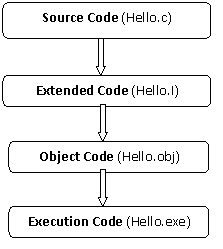
First the pre-processor convert the source code(hello.c) into the extended code(hello.i) so that compiler can understand, and then when we go for compliation the hello.i converted into hello.obj(object code) which is in the binary form, and when we go for run these binary code will execute and we get the output the executable code of the program is saved as by the .exe(executive) extension
